

The hardest part of building excel for sports club records isn’t sorting winners. It’s accurately entering decades of names and dates from physical trophies. Excel can keep a club’s history organised and searchable, but typing every engraving by hand can make a valuable archive project feel daunting.
If you’ve inherited a collection of spreadsheets, or worry that important details will leave with a long-serving member, you’re not alone. A clear structure helps preserve the record, but the information also needs to be captured consistently before it can be searched, updated, or shared.
This guide explains how to set up a practical Excel archive, choose fields that make winners easy to find, and prepare records for a digital honours board. It also covers where AI can help: Trophy Guru uses photos of trophies and honours boards to create searchable digital records, with CSV export for use in Excel. Learn how to keep the spreadsheet useful over time while reducing the manual work of transcribing physical engravings.
Key Takeaways
- Use excel for sports club records to create a searchable archive that keeps winners and competition history separate from active member data.
- Choose clear fields and consistent naming rules so future volunteers can maintain and filter records with confidence.
- Use a spreadsheet for administration and consider a digital honours board when members need an easier way to browse club history.
- Plan for the data-entry workload before volunteers begin transcribing decades of trophy engravings by hand.
- AI-assisted transcription and CSV export can help move engraving details into an Excel-ready archive.
The Role of Excel for Sports Club Records
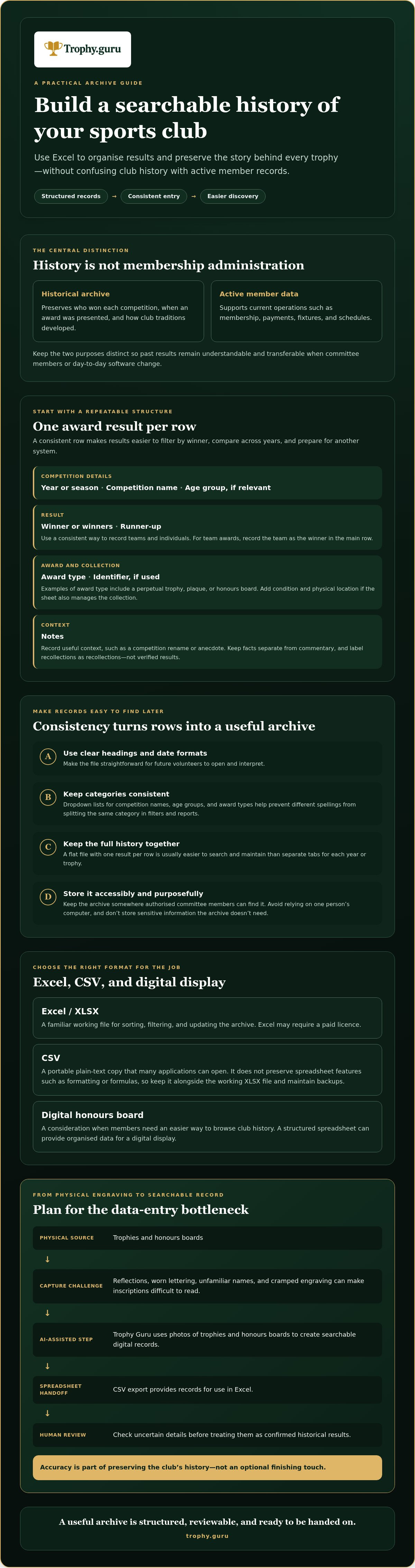
Club software often focuses on current operations such as membership, payments, fixtures, and schedules. Heritage records serve a different purpose. They preserve who won each competition, when an award was presented, and how club traditions have developed. For this work, excel for sports club records provides a familiar way to organise information without tying the archive to an active membership system.
Rows and columns make winners easy to sort, filter, and update, and XLSX files work with widely used spreadsheet tools. Excel itself may require a paid licence, so it isn’t accurate to describe the software as universally free. Clubs can also keep a portable CSV copy, a plain-text format that many applications can open. CSV does not preserve spreadsheet features such as formatting or formulas, so keep it alongside the working XLSX file and maintain backups.
This distinction matters when committee members change. Active member records may need frequent updates and access controls. Historical results should remain understandable and transferable, even if the club changes its day-to-day software. A consistent archive can also provide the organised data needed for a digital honours board for sports clubs. For an overview of Excel’s development and features, see Microsoft Excel.
Portability and Accessibility: Why Format Matters
A file is useful only if future volunteers can open and interpret it. Use clear column headings and consistent date formats, then store the archive where authorised committee members can find it. Avoid relying on one person’s computer or a club platform that makes exporting difficult. Excel can act as a working bridge between physical trophies and digital displays: keep the information structured in the spreadsheet, then export it in a suitable format when you’re ready to share or display the history.
The Limitations of Manual Data Entry
Typing inscriptions directly into a spreadsheet creates a risk of errors entering the historical record. Reflections, worn lettering, unfamiliar names, and cramped engraving can make a trophy difficult to read. A mistaken letter or year can also make a winner harder to find later.
Manual transcription takes sustained attention. Faced with a cabinet of trophies or decades of honours boards, volunteers may postpone the task, stop partway through, or leave unclear entries unresolved. The archive then preserves only part of the club’s story. AI-assisted transcription can help turn photos of engravings into searchable digital records, which can be exported as CSV for use in Excel. Review uncertain details before treating them as confirmed. Accuracy is part of preserving the history, not an optional finishing touch.
Designing a Future-Proof Sports Club Record Template
A dependable archive starts with a consistent row structure. In excel for sports club records, use one row for each award result, not one row for an entire season or trophy. This makes it easier to filter by winner, compare years, and prepare the archive for another system later.
The Essential Metadata Checklist
Use separate, clearly named columns for the details people are most likely to search. A practical starting set is:
- Year or season, competition name, and age group, if relevant.
- Winner or winners and runner-up, with a consistent way to record teams and individuals.
- Award type, such as perpetual trophy, plaque, or honours board, and an identifier if the club uses one.
- Trophy condition and physical location, if volunteers also use the spreadsheet to manage the collection.
- Notes for useful context, such as a competition rename or an anecdote. Label recollections as recollections, not verified results.
Keep factual details separate from personal commentary, and avoid storing sensitive information the archive doesn’t need. The Ann Craft Trust’s guidance on record keeping for sport offers relevant principles for clear, purposeful records.
Organise Results for Search and Export
A flat file with one result per row is usually easier to maintain than separate tabs for each year or trophy. Multiple tabs can hide gaps and make it harder to search the club’s full history. Use data validation to create dropdown lists for competition names, age groups, and award types. A controlled list prevents variations such as “U14,” “Under 14s,” and “Under-14” from splitting the same category in filters and reports.
For a team award, record the team as the winner in the main row. If individual names matter, use a separate linked table or a consistent names field rather than creating several rows that look like separate wins. Once the archive is structured, a PivotTable can summarise results by person, competition, or year for a simple Hall of Fame view.
Keep headings in the first row, avoid merged cells and blank separator rows, and use one column for each type of information. This clean structure makes it easier to export club records to CSV. Trophy Guru’s AI-assisted transcription can help populate the archive from photos; review entries before adding them as confirmed records. Information about AI trophy transcription explains one way to turn inscriptions into searchable records.
Excel vs. Specialized Digital Honours Boards
Excel and a digital honours board serve different audiences. A spreadsheet is a useful back-office archive: committee members can maintain entries, check details, filter results, and prepare reports. A digital board is designed for public access, making club history easier for members and alumni to browse without asking a volunteer to search a workbook.
The two can work together. Keep a structured master record in Excel, then use an online archive or honours board to present selected information. This also supports sound data practice. The principles of sports analytics include organised data management and information systems, foundations that matter whether a club uses a spreadsheet, a hosted platform, or both.
When Excel Is Enough for Your Club
A small club with a manageable archive and few requests for public access may find a spreadsheet entirely adequate. It can also serve as a staging area while volunteers collect and check historical results before choosing a public display. If the club has no budget for software subscriptions, start with a format it can maintain. Confirm which spreadsheet tools committee members can access, and don’t mistake a locally saved file for a backup plan.
For protection, limit access to the master file, store backup copies separately, and check that a CSV export remains readable. For a hosted archive, ask how records can be exported and what backup arrangements are in place. Don’t assume that hosting alone guarantees data protection.
The Advantages of Moving to a Digital Archive
A searchable public archive can help alumni discover past winners and let current members explore club traditions without editing the administrative file. Digitised records also preserve information if a trophy is lost or its engraving becomes difficult to read. They don’t protect the physical object, but they can help keep its recorded history available.
Before moving to a hosted service, compare more than the initial cost. Check for recurring hosting or software fees, what is included, and whether the club can retrieve its data if its needs change. Excel for sports club records can remain the editable source while a digital honours board provides the public view. For more on preparing records for this step, see this guide to digitising sports club award records. Trophy Guru offers searchable digital records and CSV export to connect trophy information with Excel and online honours boards.
The Data Entry Bottleneck: Moving from Physical to Digital
A club can have a clear template and a strong reason to preserve its history, yet still stall before completing the first row. The bottleneck is often the silverware itself. Each inscription has to be located, read, checked, and entered. Repeat the process across decades of awards and volunteer time quickly becomes the limiting factor.
To estimate the manual effort, count the awards you need to transcribe and multiply that figure by the average minutes it takes to inspect and record each one. Divide the total by 60 to estimate the hours involved. For example, a 50-year archive needs an estimate of how many awards were presented per year and how long each inscription takes to verify. The actual workload depends on the collection, but estimating it makes the scale visible before volunteers take on the project.
Traditional Manual Transcription Challenges
Old engravings may be worn, cramped, or written in cursive. Reflections on silver can make letters hard to distinguish, while a trophy’s shape and weight can complicate inspection. If items are held by different teams or stored in several places, volunteers may also need to coordinate access or bring them together for transcription.
Then comes the typing. Long sessions of copying names and years are repetitive, and one unclear character can mean another round of checking. When the work feels endless, volunteers may put it aside, leaving gaps in the archive. Work in batches, record uncertain readings for review, and avoid making one person responsible for the entire collection.
The Modern Alternative: AI-Powered Extraction
AI transcription can analyse a photograph, recognise likely lettering, and convert visible engraving text into digital record fields. Glare, image quality, and worn inscriptions can still require human review. A smartphone photo can be the starting point, but AI-assisted reading shouldn’t be treated as proof that every name or date is correct.
The workflow is straightforward: photograph, upload, review, export. Trophy Guru lets clubs upload photos of trophies or honours boards and receive searchable digital records, with CSV export for use in Excel. Check transcribed names and years against the source before adding them to the club’s master archive. This keeps the spreadsheet useful while reducing the information volunteers need to type by hand. The time saved depends on the number and legibility of the records, so don’t assume every archive can be completed in a set number of minutes.
More information about AI trophy transcription explains how trophy photographs can be turned into searchable records.
Automating Your Archive with Trophy Guru
A spreadsheet can preserve only what someone has entered. For clubs with a long history, the difficult step is often turning physical inscriptions into accurate, searchable records. Trophy Guru helps bridge that gap: clubs upload photos of trophies or honours boards, receive AI-assisted digital transcriptions of names and years, then export records as CSV files for use in Excel.
This approach can support excel for sports club records without replacing the spreadsheet. Excel remains the club’s editable working archive, while transcription helps populate it with details that would otherwise need to be typed by hand. For a closer look at the process, read about this trophy engraving transcription service.
From Silver to Spreadsheet in Three Steps
1. Capture clear images. Photograph each engraving or honours board so the lettering is visible. Reduce reflections and shadows where possible, and include the full inscription.
2. Upload and review. Upload the images for AI-assisted transcription. Check names and years against the original, especially where lettering is worn or unclear. Add club-specific details, such as competition categories, to the master spreadsheet using its established format.
3. Export and organise. Export the digital records as a CSV, then open or import the file into Excel. Compare the headings with your existing template before combining records, and retain the original photos in a club-controlled folder. A filename or reference in the spreadsheet can help volunteers connect each record to its source image.
Starting Your Club Anniversary Project
A club anniversary can give volunteers a clear reason to bring scattered records together and share the history with members. Start with a manageable group of trophies or one honours board. This creates a first batch to review before expanding the archive. Trophy Guru provides one trophy transcription free, giving clubs a way to assess how the transcription fits their records and review process.
Keep each image as a reference, check the transcription, and use the CSV export to bring confirmed details into your spreadsheet. This creates a practical path from physical heritage to a searchable archive without asking one volunteer to type every inscription manually. Learn about starting your club’s digital archive with Trophy Guru, including the free initial trophy transcription.
Make Your Club’s History Easier to Carry Forward
A well-structured spreadsheet gives club records a dependable home, while a searchable digital archive makes them easier to explore and share. The key is not choosing one tool for every job. Use Excel to organise the history, and reduce the manual work of entering inscriptions so volunteers can focus on checking and preserving the details.
Trophy Guru uses AI-assisted transcription to turn photos of trophies and honours boards into searchable digital records. Export the data as CSV for use in Excel, or make club history more accessible through a digital honours board. It’s a practical way to support excel for sports club records while keeping the story connected to its physical sources.
Digitise your club’s history with Trophy Guru and take the first step towards an archive future committee members can continue to build. Your club’s history deserves to be easy to find, share, and preserve.
Frequently Asked Questions
Is Excel the best way to keep sports club records in 2026?
Excel is a practical choice for maintaining a club’s historical results, but it isn’t automatically the best tool for every task. It lets committee members organise and filter records, while a public honours board can make history easier for members to browse. A combined approach often works well: keep a structured spreadsheet for administration and use a digital archive for public access. Consider file access, backups, and who will maintain the records.
How do I convert photos of old trophies into an Excel spreadsheet?
Use an AI transcription service to turn trophy photographs into digital records, then export those records as a CSV file and open or import it in Excel. Trophy Guru lets clubs upload photos of trophies and honours boards for AI-assisted transcription of names and years. Review the results against the inscriptions before adding them to your master archive. Clear, well-lit images can make the lettering easier to assess, especially on reflective surfaces.
What columns should I include in my sports club winner database?
Start with year or season, competition name, winner, runner-up, age group, and award type. Add trophy location and condition if the spreadsheet also supports inventory checks. A notes field can preserve useful context, such as an alternate competition name or a source reference. Keep one award result per row and use consistent labels. This structure helps volunteers filter records and makes it easier to share or export the archive later.
Can AI really read names engraved on silver trophies?
AI transcription can identify likely names and years in trophy photographs, including inscriptions on silver, but results still need human review. Reflections, worn lettering, unusual fonts, and shadows can make characters difficult to distinguish. Compare the transcription with the original image, and flag uncertain names or dates rather than guessing. Treat AI as a way to reduce repetitive typing, not as a replacement for checking historical details.
How do I export my club records from a website to a CSV file?
Check whether the website or archive provides a CSV export option, then download the file and open it in Excel. Export controls vary by platform, so consult its help instructions if you can’t find the option. Before combining the data with another spreadsheet, compare the column headings and date formats, and keep an untouched copy of the original export. Trophy Guru provides CSV archive export for bringing digital trophy records into Excel.
How can I share my Excel club records with members in a visual way?
For a simple view, create a filtered report or PivotTable that groups winners by year, competition, or person, then share a read-only copy with members. For a more public-facing experience, a digital honours board can present searchable club history without requiring members to browse a working spreadsheet. Keep the administrative master file separate, and check which details are appropriate to publish before sharing records.
What is the fastest way to digitise an old wooden honours board?
Photograph the board clearly, making sure the full text is visible and glare or shadows don’t obscure the lettering. Upload the image to an AI transcription service that handles honours board records, then review the extracted names and years against the original. Trophy Guru can create searchable digital records from uploaded photos, which can be exported as CSV for Excel. The time required depends on image quality and how legible the inscriptions are.
How do I protect my club’s Excel records from being lost or corrupted?
Keep the master workbook in a location accessible to authorised committee members, and make regular backup copies in a separate location. Retain dated versions so a damaged or accidentally edited file can be replaced with an earlier copy. Exporting a CSV can provide a simpler copy of the underlying records, though it won’t preserve workbook formatting or formulas. Test that backups open correctly, and document who is responsible for maintaining them.


