

What if a pupil could find a decades-old school award as easily as a recent championship? A physical trophy cabinet gives achievements a visible place, but crowded shelves and fading engravings can make past winners difficult to find. A digital trophy cabinet for schools makes those records searchable while the trophies remain on display.
A digital archive complements the cabinet rather than replacing it. Photos of trophies, plaques and result sheets can be transcribed with AI assistance into records containing names, years and other details, then shared through an online honours board. Staff, pupils and families can browse achievements across sport, academics, the arts and school life. A CSV export also gives staff a structured way to work with the records.
This guide explains what a digital trophy cabinet includes, how it differs from an interactive screen-based display, and how to choose an approach that respects school history and serves today’s community. You’ll also learn how to organise award histories, plan manageable updates and make achievements easier to find and maintain over time.
Key Takeaways
- A digital trophy cabinet for schools can make award histories easier to search while physical trophies remain on display.
- Turn photos of trophies, plaques and result sheets into records, then review details before publishing.
- Compare physical displays with digital records to decide how each can serve your school community.
- Start with one award category or a manageable set of records, and agree who will maintain entries over time.
- Searchable honours boards and CSV exports can help your school browse and work with its achievement history.
Digital trophy cabinet for schools: what it is and what it solves
A digital trophy cabinet for schools is an online archive where people can browse records of trophies, awards and past winners. It makes more of a school’s award history searchable than can be shown on a physical display. The aim isn’t to replace the trophy case, but to make achievements easier to find.
A physical cabinet displays trophies; a digital cabinet organises the records about them for online browsing and searching. The term can also describe an interactive touchscreen installed in a school. A screen is one way to present digital content on site, while the archive is the organised information itself. A school can use an online archive alongside its existing displays, with or without a dedicated touchscreen.
Thinking of the archive as part of records management helps clarify its purpose: capture useful information, organise it consistently and keep it usable over time. Search is only one part of that work. Clear fields and regular upkeep matter too.
What records can a school digital trophy cabinet bring together?
Start with materials that already document school achievements: trophy engravings, honours boards, plaques and result sheets. A record might include a winner’s name, the year, the award title and any other detail visible in the source. Bringing records together from different formats makes it easier to search the school’s history without relying on one cabinet or a set of hard-to-read inscriptions.
The archive can only be as complete as its source material. If a date is missing, a name is unclear or an old result sheet is damaged, digitising it may not resolve the gap. Mark uncertain details for review instead of treating a transcription as proof. This distinguishes information found in the source from information that still needs checking.
Why make school achievements searchable online?
A searchable archive changes how people find past achievements. Staff can look up an award when preparing a school history or checking an older record. Pupils and families can search for a name or year instead of scanning every shelf. Alumni can browse past achievements online without needing to be beside a particular display case.
Online access also extends the archive beyond the space available in a corridor or reception area. Physical trophies remain visible and meaningful in school, while digital records make a wider history browsable without requiring every item to be on display at once. Searchable fields such as winner, year and award name give users practical ways to find an entry, provided those details were recorded in the source and entered accurately.
To get started, decide what readers should be able to find. A consistent set of fields makes records easier to browse, review and maintain as new achievements are added.
How a digital school trophy cabinet turns inscriptions into usable records
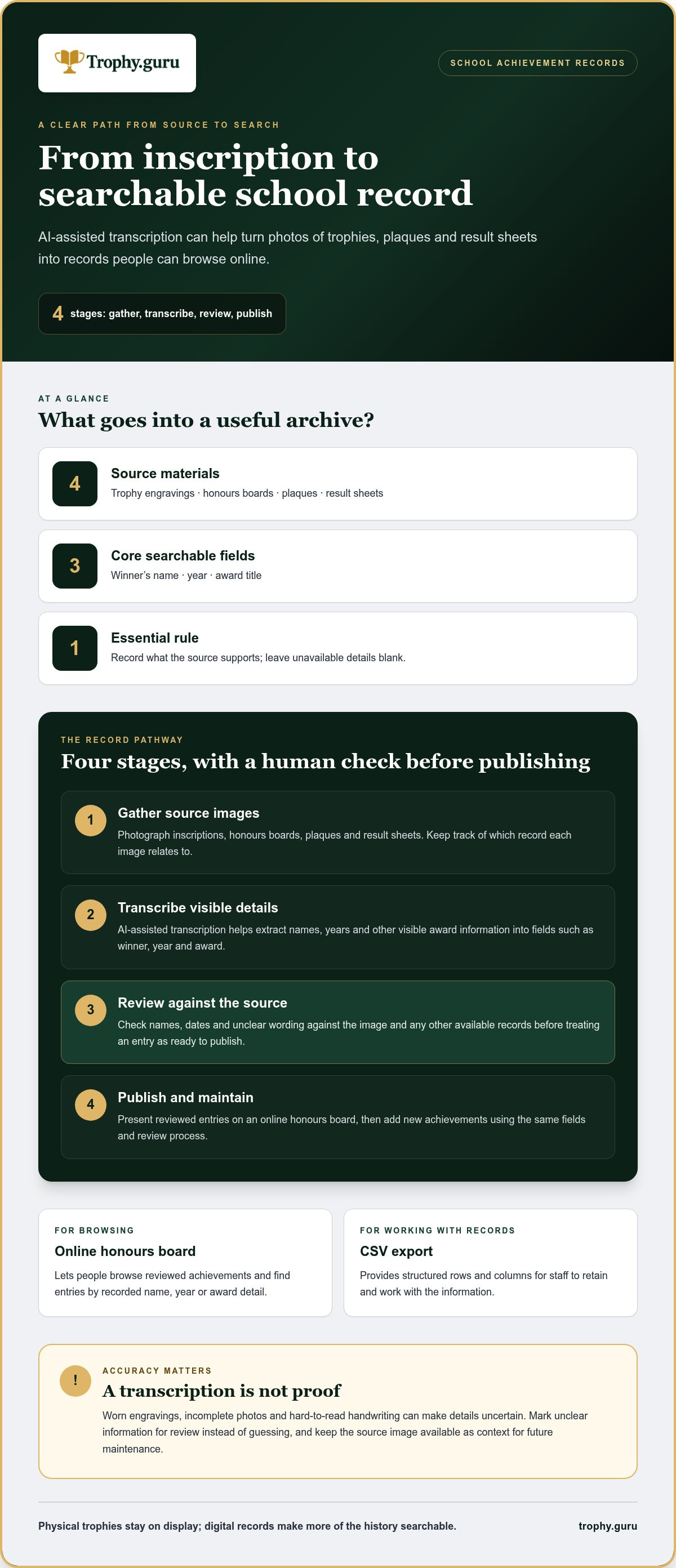
A photograph preserves what can be seen; transcription turns visible details into searchable fields. In a digital trophy cabinet for schools, uploaded photos of trophies, plaques and result sheets are processed with AI assistance to identify names, years and other visible award information. The details can then be reviewed and presented as searchable records.
The process works best as a careful sequence, not an automatic leap from image to trusted history:
- Gather source images. Collect photos of inscriptions, honours boards, plaques and result sheets. Keep track of which record each image relates to.
- Transcribe the details. AI-assisted transcription helps extract visible text and organise it into fields such as winner, year and award.
- Review the entries. Compare extracted details with the source image and other available records. Check names, dates and unclear wording before treating an entry as ready to publish.
- Publish and maintain. Present reviewed records through an online honours board, then add new achievements using the same fields and review process.
AI can reduce manual data entry, but it shouldn’t be treated as infallible. An engraved name may be worn, a photograph may not show the full inscription, or handwriting on a result sheet may be difficult to read. Mark uncertain details for checking rather than filling gaps with guesses. Keep the source image available as context for anyone maintaining the archive later.
From trophy photograph to searchable school record
Choose images that show the inscription or result clearly, and keep the original source available during review. A single image may contain several award details, while an older plaque may show only a name and year. Record what the source supports and leave unavailable information blank. This keeps the archive useful without presenting an incomplete source as more certain than it is.
Good record-keeping depends on consistent handling as well as transcription. The National Archives and Records Administration (NARA) guidelines for records management offer a general reference for organising and maintaining records. Schools should apply their own relevant policies when managing pupil information.
What an online honours board and CSV export add
An online honours board gives people a place to browse the school’s reviewed achievement records. Searchable fields make it easier to locate an entry by name, year or award detail, rather than relying on someone to recognise a trophy in a display. A CSV export puts the information into structured rows and columns, making it practical to retain and work with the archive in spreadsheet software.
For a closer look at how inscriptions can be transcribed into digital records, explore this guide to AI trophy engraving transcription. Schools can use Trophy Guru’s AI-assisted transcription to turn uploaded source photos into records for an online honours board and CSV archive.
Digital vs physical trophy cabinets for schools: choose a visible, searchable approach
A physical trophy cabinet and a digital archive serve different purposes. A cabinet lets pupils and visitors see the trophies, plaques and objects that represent school achievements. Digital records make names, years and award details easier to search, and can include more history than a single display can hold. A digital trophy cabinet for schools can bring these strengths together rather than asking the school to choose one approach and abandon the other.
| What matters | Physical cabinet | Digital records |
|---|---|---|
| Visibility | Places real trophies and awards on view in a shared school space. | Lets people browse records online, beyond the cabinet’s location. |
| Finding a past winner | Usually means looking through the displayed items and reading their inscriptions. | Searchable fields can help users locate names, years or award details. |
| Record detail | Shows the object and the information engraved or attached to it. | Can organise recorded details into fields, subject to what source materials show. |
| Updating | New trophies need space and a place in the display. | New records can be added to the archive as achievements are documented. |
What physical trophy cabinets do best
There’s particular value in seeing a real object: the size of a cup, the marks of age, or a plaque displayed where pupils pass every day. These displays make school history tangible and give significant achievements a visible place in the building. Their limits are practical: space is finite, and a cabinet’s location determines who can see its contents in person.
When a school benefits from a digital companion
A digital companion is useful when the school wants people to browse a longer history than can fit on shelves or walls. An online honours board can extend access to records beyond the physical display space while leaving trophies in place. For ideas on building an archive from existing material, see this school trophy records digitisation guide.
The two formats also support different kinds of discovery. A visitor in reception might notice a trophy and read its inscription; someone searching online might start with a pupil’s name or an award year. A digital archive can help connect those records, but it doesn’t reproduce the experience of standing in front of the object. Keep that distinction in mind when deciding what to display and what to record.
For a practical hybrid approach, keep the trophies the school wants to showcase and use digital records to make the broader award history easier to browse. The archive can cover achievements that aren’t currently on display, while the cabinet continues to provide a shared, in-school presence. Together, they preserve both the objects and the information that helps explain their place in school history.
Plan a digital trophy cabinet for your school with a manageable rollout
A well-planned archive is easier to build and maintain. Rather than trying to digitise every award at once, define a first phase that staff can gather, review and publish carefully. A digital trophy cabinet for schools can grow over time, provided the school agrees what belongs in the archive and how each record will be handled.
Before starting, consider the school’s own policies for publishing personal information. Decide which records are appropriate to make available, who reviews them, and how corrections or removal requests should be handled. This keeps publication decisions within the school’s established processes rather than leaving them to individual staff members.
Set the scope and organise source records
Choose a clear starting point, such as one award category, a particular period or a manageable group of records. Identify the source materials for that phase: trophy inscriptions, plaques, honours boards or result sheets. A guide to digitising school trophy records can help staff think through the materials and information to gather.
Keep a simple inventory of sources and note which details are readable, incomplete or uncertain. For example, if a result sheet shows an award and year but not the winner’s full name, flag the missing detail for review instead of filling it in from memory. This gives the school a clear view of what has been captured and what still needs attention.
Keep school award records consistent over time
Agree on a shared format before adding entries. Decide how to write names, represent years and record award titles, including differences in wording across older sources. Consistency makes the archive easier to browse and helps staff distinguish between separate awards with similar names. Keep a note of the conventions so they remain clear when responsibility changes hands.
Assign ownership to a suitable school role or team. That person can review corrections, check proposed additions and make sure records follow the school’s publication policies. The process needn’t be complicated, but it should be clear enough that new entries don’t depend on one person’s memory.
Set a review routine that fits the school’s calendar and archive. For instance, staff might gather new award details after a relevant event, then review them together before publishing. The right rhythm depends on how often records are added and the school’s own procedures. Keep source materials available for reference, and resolve uncertainty or clearly note it rather than silently turning it into a fact.
- Define the first phase: Select a focused category or group of records.
- Set the fields: Agree how names, years, award titles and uncertain details will be entered.
- Review before publishing: Compare entries with source records and apply school policies.
- Assign ongoing ownership: Establish who maintains additions and corrections.
Once the scope and review process are clear, Trophy Guru can help turn uploaded source photos into searchable records through AI-assisted transcription. Start organising school award records with Trophy Guru.
Make school trophy records searchable with Trophy Guru
Once a school has chosen which achievements to record and how entries will be reviewed, the next step is turning source material into a usable archive. Trophy Guru turns photos of trophies, plaques and result sheets into searchable digital records through AI-assisted transcription. An online honours board gives the school a way to present those records beyond a physical display.
A practical route from school trophies to a searchable archive
Upload source photos to begin. Trophy Guru uses AI-assisted transcription to extract visible details such as names, years and award information, helping organise them into digital records. Staff can then review entries against the source material, correcting details or checking anything unclear before sharing the records.
That sequence matters: upload, transcribe, review, then publish. AI can help with reading and data entry, but the source image remains the reference for confirming historical details. Once reviewed, records can appear on an online honours board, where people can browse the school’s awards and search the details captured in each entry.
Schools can also export the archive as a CSV file. This structured format arranges information in rows and columns, making it practical to retain the data or work with it in spreadsheet software. The honours board supports browsing; the CSV provides a portable way to work with the underlying records. Together, they make a digital trophy cabinet for schools useful to its audience and to the staff maintaining its history.
For a closer look at the transcription approach behind this workflow, explore the guide to AI trophy engraving transcription.
Start with one record and build at a steady pace
A school doesn’t need to prepare its entire archive before seeing how the process works. One initial trophy transcription is available free, giving staff a simple starting point. Choose a record with a clear source image, upload it and review the extracted details. This helps the school see how source information translates into a digital entry before deciding how to organise a wider collection.
If the school wants to process additional trophies, a paid option is available. There’s no need to rush the expansion. Use what the first record reveals to refine the fields, review steps and publishing approach, then add records at a pace that fits the school’s priorities and capacity.
Preserve the source information, check each entry and make the archive easier to search over time. Try Trophy Guru with an initial trophy transcription and take the first step towards a searchable school honours archive.
Give your school’s achievement history a clear next step
The first record can help your school decide what a useful archive should become. Consider which stories you want future pupils, families and staff to be able to find, then build a steady process around preserving them. A digital trophy cabinet for schools can keep that history accessible while physical awards continue to hold their place in school life.
Trophy Guru turns photos of trophies, plaques and result sheets into searchable records through AI-assisted transcription. Schools can present their archive on an online honours board and retain structured data with CSV export. One initial trophy transcription is available free, giving your team a practical way to begin with a single record and see how it fits your approach.
Start with an achievement that matters to your school. Review the record, consider what you’d like to make searchable next, and let the archive grow at a pace that suits your team. Try Trophy Guru with one free trophy transcription and take a thoughtful first step towards preserving your school’s achievements for the future.
Frequently Asked Questions
Can a digital trophy cabinet replace a school’s physical trophy display?
No, it doesn’t need to. A searchable archive and a physical display serve different purposes: one helps people find information, while the other lets them see the actual awards. A school might keep its most significant trophies in a shared space and use digital records to provide context or cover achievements that aren’t on view. The right balance depends on the school’s priorities and available display space.
What information can a school include in a digital trophy cabinet?
A school can include details supported by its records, such as the award title, winner’s name, year and source material. Depending on what the original inscription or document says, an entry might also note a team, event or category. Agree on the fields before adding records, and avoid filling gaps with assumptions. If a detail can’t be verified from available sources, leave it blank or mark it for review.
Can Trophy Guru create searchable records from photographs of trophies?
Yes. Trophy Guru uses AI-assisted transcription to extract visible information from uploaded photos of trophies, plaques and result sheets and turn it into digital records. For example, an image of an engraved cup can provide a winner’s name and award year for a searchable entry. Review the transcribed details against the source image before publishing, especially where lettering is worn, reflective or unclear.
Can a school export its digital trophy cabinet records?
Yes. Trophy Guru lets schools export archive data as a CSV file, a structured format that can be opened and worked with in spreadsheet software. This can be useful when staff need to sort entries, review fields or retain a working copy of the record data. Before using an export, decide who is responsible for maintaining it and how the school will manage copies alongside its published archive.
Is there a free way for a school to try trophy transcription?
Yes. One initial trophy transcription is available free. A school can begin with a single award record, then review how its source information appears in the digital entry. This offers a practical way to assess whether the captured details are useful for the school’s archive before deciding whether to process additional trophies. A paid option is available for processing more trophies.
What should a school do when an old trophy engraving is difficult to read?
Don’t guess at an unclear name or date. Keep the original image with the record, note which detail needs checking and compare it with other available school sources, such as an honours board or result sheet. If the inscription remains uncertain, preserve that uncertainty in the entry rather than presenting a likely reading as confirmed. A clear record of what is known helps future staff revisit the question.
How can a school keep a digital trophy cabinet up to date?
Assign responsibility for additions and corrections to a school role or team, then agree when new achievements will be reviewed for inclusion. Use consistent formats for names, years and award titles so entries remain uniform as the archive grows. Keep a simple record of unresolved questions and check new entries against their source material. Follow the school’s own policies when deciding what information to publish.


